Your customer asks where their order is. Someone checks a spreadsheet, someone searches a group chat, and someone opens an email thread. Ten minutes later, you have an answer, but three people have stopped their work to find it. How do you identify software requirements that would make this easier?
Start by observing the work, talking to the people involved, and recording what needs to change. Turn each need into a clear requirement with a priority and a way to check it. A request for a dashboard becomes useful when you specify which information it must show and who keeps that information current.
This guide follows one order-handling example from gathering software requirements to choosing and testing a solution. You can use the tables to describe your own needs without technical jargon.
1. Define the business problem you want software to solve
“We need better software” leaves everyone imagining a different product. Describe who is affected, what slows them down, and how you will measure it. That gives your project a shared purpose before anyone proposes features.
For our example, follow several orders through a normal week. Record the time spent checking details and asking colleagues for updates, without counting the same interruption twice. Your observations become a concrete starting point.
| What to establish | Example from the order process |
|---|---|
| People affected | Sales answers questions; operations searches for updates |
| Recurring obstacle | Order details are spread across three tools |
| Starting measure | The team spends 18 hours a week checking details |
| Desired change | One person can give a reliable answer from a shared record |
Note: The business and numbers throughout this article are illustrative. Use your own observations to set a starting point and improvement target.
You now have a problem you can investigate. The next step is to find what keeps causing it.
2. Gather requirements from the people doing the work
Ask your team to walk through a recent order, including one that went wrong. In our example, sales records the order in a spreadsheet, operations confirms availability in chat, and a changed delivery date arrives by email. Each tool holds part of the answer.
The delay comes from having to reconstruct a trustworthy picture. The diagram shows how a shared order record could change that relationship: updates reach one place, and the person answering the customer reads from it.
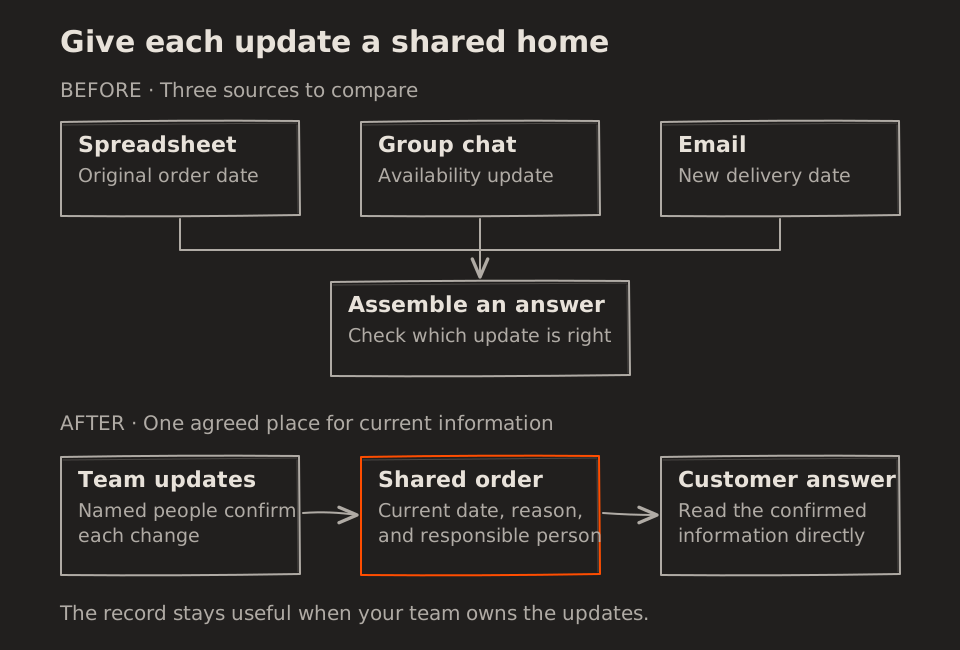
Before removing a workaround, ask what it supports. A private sheet may track partial deliveries that the current tool cannot represent. That missing capability belongs in your understanding of the problem, which now becomes the basis for requirements.
3. Write clear software requirements with examples
A useful requirement describes what people need to do and how you will know it works. You can write it in everyday language and review it using a sample order or a drawing of the proposed screen.
| Observed problem | Requirement | How to check it |
|---|---|---|
| Different delivery dates appear in different tools | Show the latest confirmed date and why it changed | Sales answers a date question without messaging operations |
| Unresolved orders have no clear owner | Give each issue a responsible person and next action | A delayed order shows who will follow up |
| People overwrite confirmed information | Agree who can confirm changes and retain their history | The team can identify who changed a date and when |
These examples describe what the software must let people do, often called functional requirements. Also capture the conditions that make it useful: who can access order details, how quickly a record must open during a call, and how work continues during an outage. These are non-functional requirements, covering qualities such as security, speed, and reliability.
Agree on measurable expectations with your team. “Fast enough” is unclear; an agreed response-time target can be checked. Record each requirement in a shared list with its business reason, responsible person, priority, and check. This becomes a simple requirements document you can review with a supplier.
Quick check: If you cannot connect a requirement to an observed problem, clarify its purpose before adding it to the first version.
With those requirements visible, you can decide which changes must arrive together.
4. Prioritize requirements for a complete first version
For our team, a useful first version lets someone record an order, update its progress, and answer the customer from that record. A small version still needs a complete path through the work. Missing one of those steps may send people back to the same collection of messages and sheets.
| Include first | Why it belongs | Consider later |
|---|---|---|
| Shared order details | Everyone needs the same current information | Personalised screen layouts |
| Confirmed status and delivery date | These directly answer the customer’s question | Custom reporting dashboards |
| An owner for unresolved issues | Someone must act when an order gets stuck | Extra notification preferences |
These priorities belong to this example; yours should follow your own requirements. Keep later ideas in a separate list so you can revisit them after learning from use. You now have enough scope to compare ways of delivering it.
5. Compare existing tools and custom software
Your requirements may fit a tool you already have. If it can hold the shared record, agreeing how to use it could address much of the problem. Where useful tools still require repeated copying, connecting them may help. Custom software is another option when essential work remains difficult to support.
| Approach | When it may fit | Main trade-off |
|---|---|---|
| Improve the current process | Your tools already support the work | Your team must agree on and follow the process |
| Configure an existing product | It covers your essential requirements | Some workflows must adapt to the product |
| Connect your tools | Each works, but information is copied between them | Conflicting updates and failed transfers need clear handling |
| Build custom software | Essential requirements remain unmet | You own ongoing support and changes |
Compare the effort of running the solution as well as creating it. Someone must help users, maintain accurate information, and respond when the business changes. For the rest of our example, suppose a small shared application fits best after reviewing these options. Its workflow is the next thing to clarify.
6. Map the workflow before building the software
Walk through an order from arrival to completion. Record the details once, confirm availability, update progress, and assign any delivery issue to someone. Check what happens when information is missing or the customer changes their mind.
This walkthrough can also reveal unnecessary steps. A copied spreadsheet may exist only to give another team visibility. Once the shared record provides that visibility, you can assess whether the copy still serves a purpose.
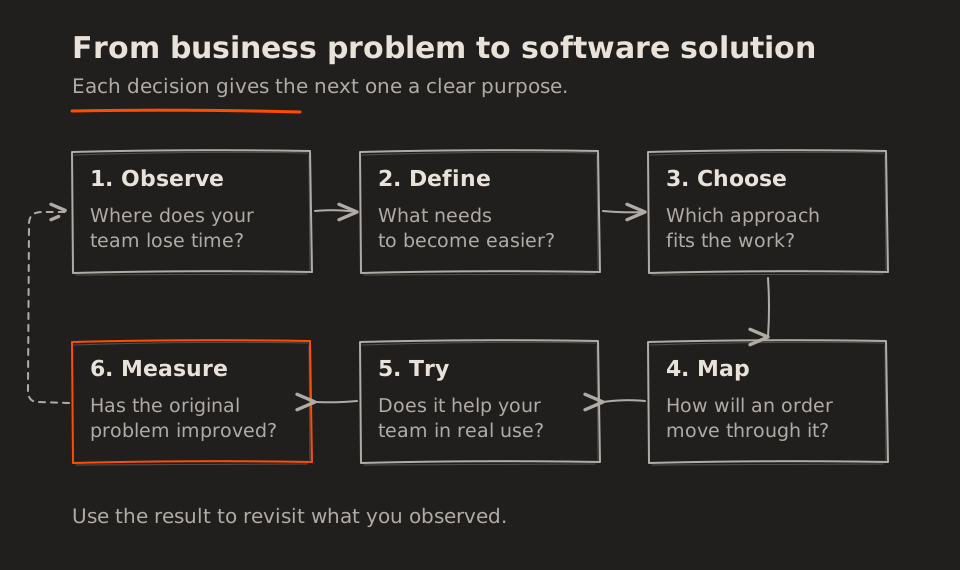
Each decision should remain connected to the original delay. In this overview, observation gives you requirements, requirements guide the solution, and real use supplies evidence to revisit your assumptions.
Note: Boxes and arrows on paper are enough to start. The goal is to make responsibilities and decisions clear to everyone who handles the work.
Once your team can walk through the process together, try a working version.
7. Validate software requirements with real work
Begin with a manageable group and a defined set of orders. Agree where updates belong, who can help, and how work continues if something fails. Choose one authoritative record during the trial so backup arrangements do not create another source of conflicting information.
Watch people finish the task, including its awkward cases. If someone returns to a private spreadsheet, ask which job it helps them complete. They may need a missing capability or support learning the new process.
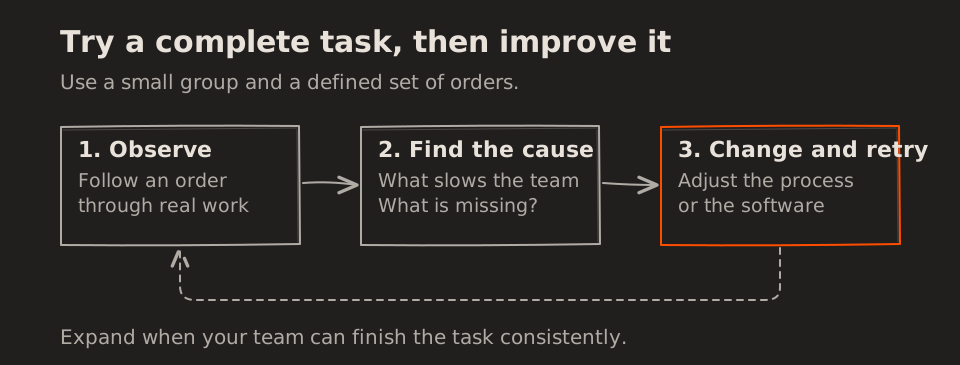
Record what happened, who it affected, and how often. Address the most disruptive issues, then repeat the same task to see whether the change helped. Once use becomes consistent, you can compare results with your starting measures.
8. Measure whether the business problem has improved
Compare similar periods using the same definitions and comparable order volumes. A quieter week may reduce total checking time without making any individual order easier to handle.
| Measure | Before | After | What to investigate next |
|---|---|---|---|
| Weekly time checking details | 18 hours | 6 hours | Where checks still occur |
| Orders needing a correction | 7% | 2% | Which mistakes remain |
| Average time resolving an order question | 14 minutes | 5 minutes | Whether the answer is complete |
Note: These are hypothetical results, not promised returns. Include any new effort needed to maintain the shared record when judging improvement.
Ask your team whether work has become easier or merely moved to someone else. Check whether customers need to call again for clarification. Success means the original problem has become smaller in everyday use.
That evidence helps you decide whether to expand, refine, or reconsider the solution. Our article on understanding the ROI of software explores how to weigh the effort and cost against useful business change.
Return to the customer waiting for an answer
The customer still asks where their order is. This time, the person answering opens the shared record, sees the confirmed date and its explanation, and responds. Their colleagues continue with the work already in front of them.
You identified the software requirements by tracing the delay, listening to your team, and agreeing on a checkable improvement. Choosing a focused solution and testing it in real use turned those requirements into a reliable answer for the customer. Start with one recurring situation in your own business and follow the same path.
A clear business problem gives your software a useful job to do and gives you a practical way to know when it is helping.