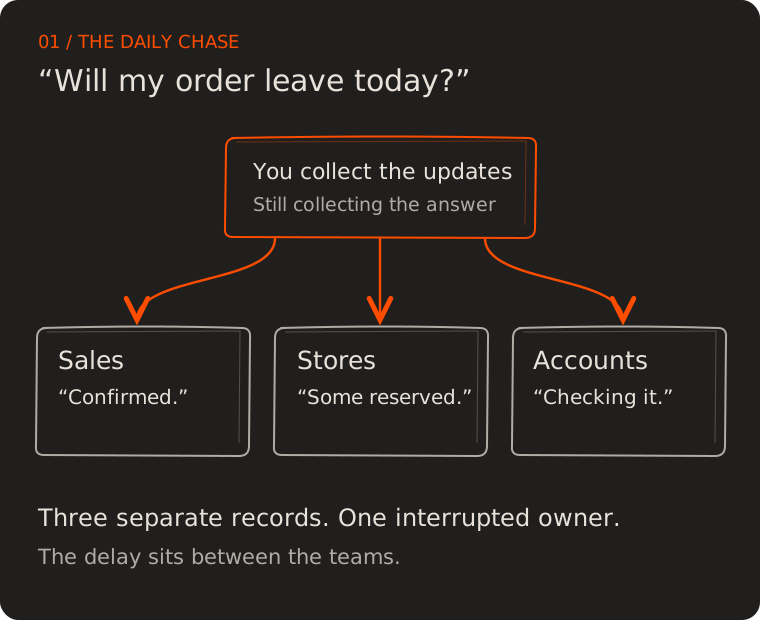
A customer calls with a simple question: “Will my order leave today?”
You ask sales, who says it is confirmed. The storekeeper checks the shelf, then remembers that some of those boxes belong to another customer. Accounts is still checking a payment. Ten minutes later, you have spoken to three people and still cannot give a clear answer.
If you run a growing business, that conversation may feel familiar. You have software, spreadsheets and a capable team, yet ordinary questions keep coming back to you. You spend part of the day carrying information from one person to the next.
ERP software can help connect orders, stock, purchasing and accounts so your team can answer from shared records. The useful question is whether it can remove the chasing that interrupts your day. Let’s follow one order to see what that means, what you actually need, and how to choose a sensible starting point.
What is ERP software, in plain English?
ERP stands for enterprise resource planning. It is business management software that connects work across departments through shared records. Oracle’s overview of ERP describes this connection across activities such as accounting, purchasing, projects and supply chain operations.
Think of an order with its own folder. Sales adds what the customer wants. Stores records what is available and what has been set aside. Dispatch records what left. Accounts records the invoice and payment. Each person works on their part, while the linked records keep the whole story visible.
That is the practical idea behind ERP. A stock update should help sales make a promise. A delivery confirmation should help accounts prepare the appropriate invoice. A recorded payment should help the person following up avoid asking a customer to pay again.
An ERP can only show what has been recorded or received from connected tools. If dispatch updates the system at closing time, the afternoon status may still be wrong. Shared information becomes useful when keeping it current is part of doing the work.
When does a small business need an ERP system?
Company size alone is a poor guide. A small team handling several warehouses, partial deliveries and customer credit may have more coordination work than a larger team with a simple service.
Look at what happens when you step away. Can someone answer which orders are delayed, what stock is available to promise, and which payments need attention? Or does work pause until you return because you hold the missing context?
Repeated entry is another clue. If the same customer details travel from a message to an order sheet, a dispatch register and an invoice, every copy creates another place to check. Disagreements between records then become somebody’s daily task.
A full ERP may be premature if the gap is narrow. When your only problem is forgetting to follow up on enquiries, a shared task list or CRM may be enough. ERP deserves a closer look when several teams repeatedly need the same information to complete connected work. Our guide to recognising when your business needs software can help you identify that boundary.
Follow one order from promise to payment
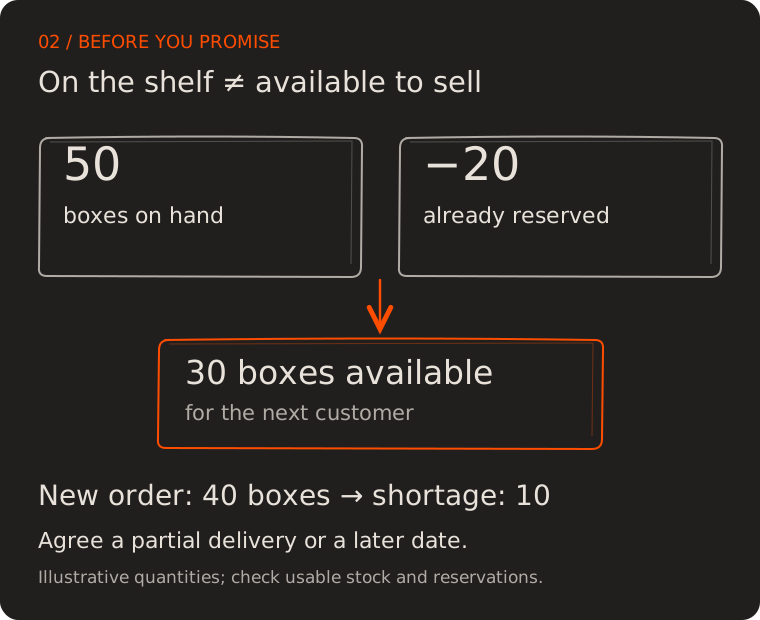
Suppose a customer orders 40 boxes. Your stock sheet shows 50, so sales promises delivery today. But stores has already reserved 20 for another customer. You have 30 available for the new order, leaving a shortage of 10.
These are illustrative numbers, but the distinction matters: stock on the shelf and stock available to sell are different answers. A configured ERP workflow can show both before sales makes a commitment. Your team can then agree a partial delivery, arrange a purchase, or offer a realistic later date.
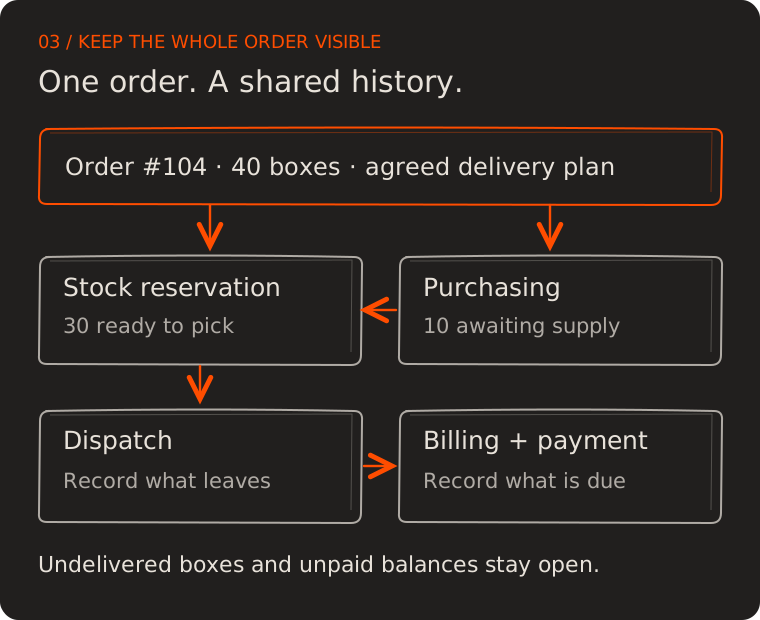
Once the customer agrees, the order carries that decision forward. Stores sees the quantity to pick. Purchasing sees the shortage if replenishment is required. Dispatch records what actually leaves. Accounts prepares billing according to the agreed terms and applicable requirements, with access to the delivery record.
Now imagine the customer pays part of the invoice. Accounts records the payment and the remaining balance. The person following up can see what is still due, any dispute, and who owns the next conversation. They do not need to reconstruct the sale from messages.
The order may still involve judgement and phone calls. What changes is that the next person starts with the information already collected.
Which ERP features should you start with?
A long feature list can make every module seem urgent. Start by asking which missing answer causes the next delay. That answer tells you what the first part of the system needs to do.
| Your daily question | Capability to look for | What to ask the provider to demonstrate |
|---|---|---|
| Can we promise this delivery? | Sales orders and stock reservations | Available stock after existing commitments |
| What needs ordering? | Purchasing and supplier tracking | Shortages alongside purchases already on the way |
| What has actually left? | Dispatch and delivery records | A partial shipment with the balance still open |
| Who still owes us? | Invoicing and payment allocation | A partial payment and a disputed amount |
| What happened to this return? | Returns and credit tracking | Goods received back with credit still pending |
| What needs my decision? | Reports, task ownership and alerts | An unresolved item with an owner and due date |
Other businesses will need different starting points. A manufacturer may need materials and production planning. A service company may need project costs and billing milestones. HR, payroll and asset management may matter later, depending on the business and the product’s scope.
For our 40-box order, stock reservations and order visibility are the immediate need. Adding an unrelated module will not resolve the ten-box shortage. Keep the first scope close enough to the problem that your team can tell whether it has improved.
Should you buy an ERP, connect your tools or build?
First check the software you already pay for. It may support reservations, purchase orders or shared access that your team has never configured. Fixing how an existing tool is used can be a reasonable first step.
If several gaps remain, compare three approaches against the same real orders. An existing ERP offers connected modules you can configure. Integrating your tools lets useful systems continue working together. A custom application can support unusual rules that are important to your business.
| Approach | Consider it when | Check before committing |
|---|---|---|
| Configure an existing ERP | Standard workflows cover most of your needs | Staff can complete your awkward cases without side spreadsheets |
| Connect current tools | The tools work well individually and only a few handoffs are missing | Failed updates are visible and someone owns fixing them |
| Build a focused workflow | A recurring business rule cannot be handled well by available options | Delivery, maintenance, support and data export have clear owners |
A custom workflow does not need to become a complete custom ERP. You might keep established accounting software and build an order or approval layer around it. The connections still need reliable identifiers, error handling and a clear record of which system owns each value.
Cloud versus on-premises is a separate choice: it concerns where the software runs and who operates it. Ask how staff will access it, what happens during an outage, and who handles updates and recovery. The deployment model alone does not tell you whether the workflow fits.
Ask for a demonstration using your difficult order
Bring the provider an example from your own business, with sensitive details removed. Use the 40-box order, the ten-box shortage, a partial delivery and a partial payment. Ask the person who normally enters orders to work through it with them.
Watch the handoffs. Can sales see the shortage before promising delivery? Does the undelivered balance remain open? Can accounts find the shipment and payment without typing the same details again? Can a manager see why the order is still unfinished?
Then change something. Cancel the remaining quantity or correct an entry. Ask who may make the change and whether the history remains visible. A system that handles corrections clearly is easier to trust in daily use.
Make these requirements part of the agreed scope. “Manage inventory” is broad; “show available stock after reservations before confirming an order” is testable. The software requirements guide explains how to turn a recurring frustration into that kind of brief.
What does an ERP solution really cost?
The subscription or development quote is only part of the commitment. Compare setup, data cleanup, integrations, training, support, ongoing hosting or licences, and the staff time needed to introduce the system. Ask how costs change as users, locations or transaction volumes grow.
You can also measure the work you hope to remove. Suppose your team spends an extra six minutes per order checking and copying information. At 20 orders per day over 22 working days, that is 44 hours a month. If a pilot reduces that work to two minutes per order, it releases roughly 29 hours.
Those figures are an example, not an expected result or a cash-saving promise. People still need time for exceptions and accurate record keeping. Released time becomes valuable when it goes into useful work, and it does not automatically reduce payroll.
Compare the observed improvement with the full cost of the system. Track fewer mistaken delivery promises or faster invoicing separately, without counting the same benefit twice. Our software ROI guide goes further into that decision.
How to introduce ERP without overwhelming your team
Choose one connected workflow and a clear pilot boundary, such as a branch or a small group of customers. Include the people who take orders, check stock, dispatch goods and record payments. Someone must own the complete process, including decisions that cross departments.
Prepare the records this pilot needs: active products, customers, open orders, stock and relevant balances. Resolve duplicate product names and inconsistent units. “One box” must mean the same quantity to sales and stores. Check starting figures against records the business trusts.
Agree which system is authoritative during the pilot and how you will compare results. An uncontrolled period of entering everything twice can create the same confusion you are trying to remove. If temporary parallel checks are needed, give them an owner, a purpose and an end condition.
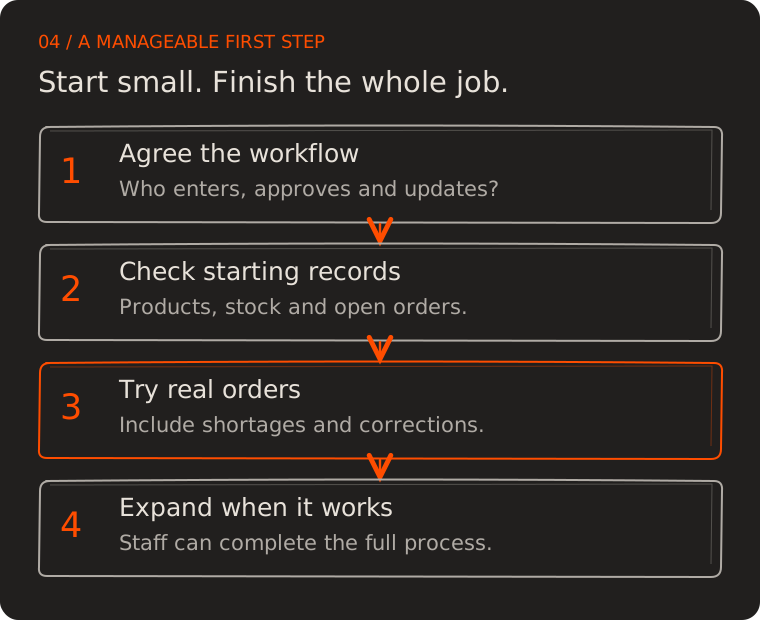
Train people on actual tasks: reserve stock, record a short delivery, correct a mistake and find an unpaid balance. Keep a short issue list. Separate missing information from confusing screens and unclear business rules so each problem gets the right fix.
Before expanding, confirm staff can finish ordinary work and handle the agreed exceptions. Review access permissions, backup recovery, support contacts and data export. These are practical ownership questions: who helps when something breaks, and can the business recover its records?
How will you know it is working?
Start with the question in the opening phone call. Measure how long it takes to give a reliable delivery answer, and how often that answer later changes because information was missing. Compare the pilot with the earlier process after staff have had time to learn it.
Then check the neighbouring work. Are orders entered once? Are undelivered quantities still visible? Do payments reach the right invoice? A faster sales screen is less useful if accounts now spends longer correcting its output.
Ask your staff what they still keep outside the system. A side spreadsheet may reveal a legitimate gap, a training need or a report that is difficult to find. Investigate it before declaring the rollout complete.
Give your team an answer they can use
ERP software earns its place when routine work becomes easier to follow. Start with the recurring question that costs you the most interruptions, trace the records behind it, and ask any proposed solution to demonstrate the whole answer.
If you want help defining that first scope, send Melman Labs an outline of your workflow, the tools you use and where the repeated checking happens. Include one ordinary order and one difficult case so the conversation starts with your actual work.
Now return to the customer asking, “Will my order leave today?” Your team opens the order and sees 30 boxes ready, 10 awaiting stock, and the agreed delivery plan. They can explain the situation and the next step.
You may still need to make a decision about that shortage. You should be able to spend your time making the decision, with the facts already in front of you.