Your pharmacy agency has had a busy day. Orders are coming in, but you still need three phone calls to answer one simple question: What needs my attention before we close?
The orders are on WhatsApp, the salesperson remembers a retailer request, accounts is following an overdue invoice, and the godown has noticed a batch that is moving too slowly. The information exists, but it is spread across conversations, registers, spreadsheets, and billing screens.
If you run a medicine wholesale agency or work as a pharma stockist, those gaps can delay dispatch, leave cash tied up in stock, and turn a routine retailer enquiry into another round of calls. Pharmacy distribution software can connect the records around a sale, from receiving an order to collecting payment and closing a return. Your relationships stay personal; the repetitive checking, re-entry, and follow-up become easier to manage.
You may already have billing software. The opportunity is often to connect the work around it: who checks the order, who follows up, and how everyone knows it is complete.
The eight examples below are practical places to look for that improvement. They are workflow examples, not promised business results. The right starting point depends on the records and systems your agency already uses.
1. Keep Every Retailer Order in One Visible Flow
A retailer may order by phone, WhatsApp, a handwritten photo, or through your salesperson. That flexibility helps sales, but it also creates several places where an order can wait, be misunderstood, or get entered late.
Pharmacy order management software can turn each request into one visible record with the retailer, products, quantities, source, salesperson, and current status. Your team can still accept orders through familiar channels while everyone sees what has arrived and what needs action.
For example: a salesperson sends three retailer orders after a market visit. Instead of forwarding messages until someone types them into billing, the orders enter a shared queue. The salesperson can see when each one is checked, billed, and sent to dispatch.
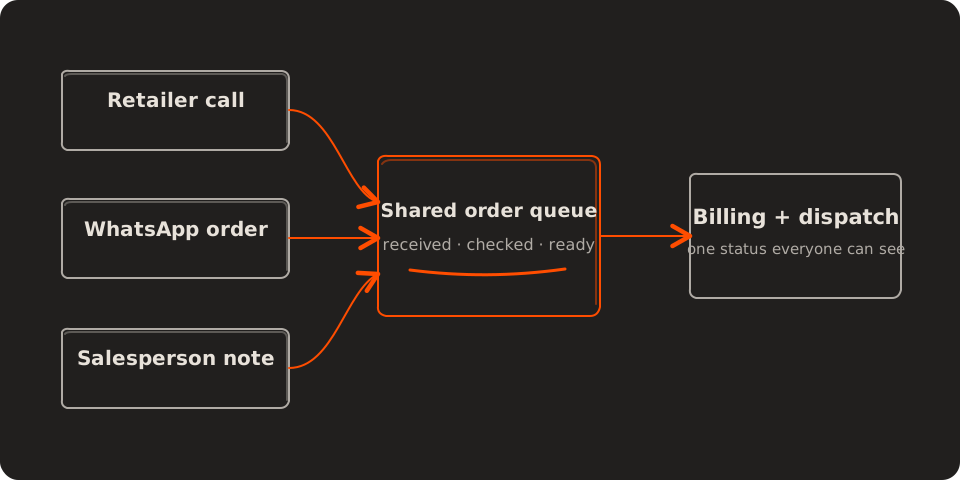
When a retailer asks whether an order will leave today, your salesperson can give a useful answer without interrupting billing. A visible order queue helps you protect the delivery promise. Compare how many orders miss your dispatch cutoff because they were entered late.
2. Reduce Repeated Order Entry and Product Matching
Receiving the order is only the beginning. Someone still has to interpret abbreviated medicine names, choose the right pack, enter the quantity, check stock, apply the commercial terms, and verify the result.
Repeated data entry takes time away from selling and customer service. It also creates a quiet risk: a similar product name, strength, or pack size can turn a small entry mistake into a return or an urgent correction.
With a supported message integration or staff upload, software can prepare a structured draft from the incoming request and bring uncertain matches to a person for review. The team confirms important product and quantity decisions; the system removes avoidable typing around them.
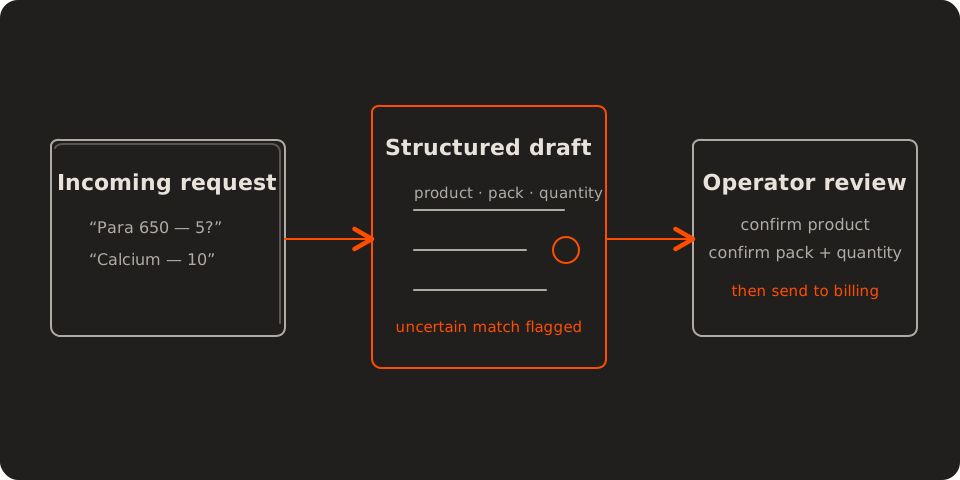
Your operator reviews a prepared order instead of rebuilding every line. That leaves more time to resolve missing items before dispatch. Compare entry time per order alongside product corrections; faster processing only helps if accuracy holds.
3. See Fast and Slow Stock Before Either Costs a Sale
Inventory reports tell you what is present. Salespeople need to know what may disappear before the next purchase arrives, while the owner also needs to know which stock is tying up cash without moving.
A useful pharma inventory management workflow compares recent movement, usable stock, incoming purchase orders, and supplier lead time. It can bring exceptions forward instead of asking someone to study every item every morning.
For example: one product has four days of stock left and normally takes six days to replenish. Another has four months of stock and has barely moved in the last six weeks. Both need attention, but they need different sales and purchase decisions.
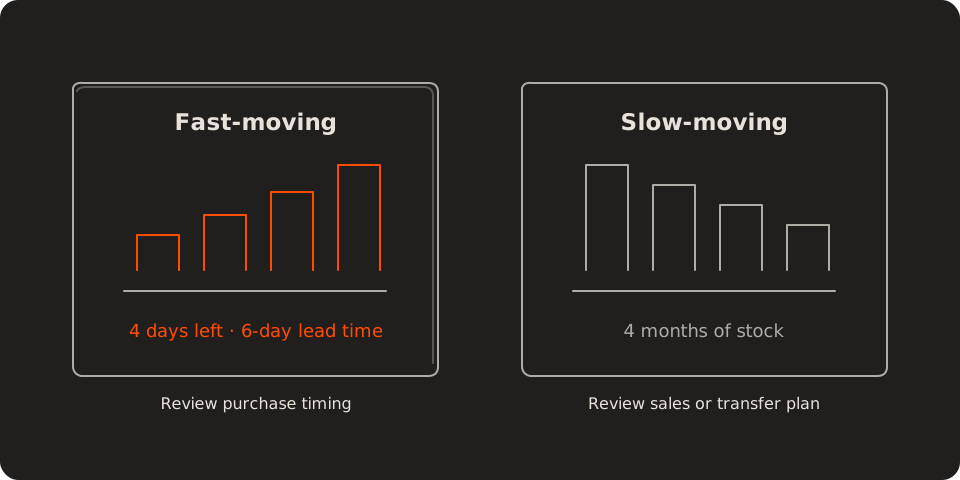
A shortage can send a regular retailer elsewhere, while excess stock uses money you could put into products they keep asking for. Better stock visibility supports both availability and working capital. Review stock-outs and slow-stock value together so solving one problem does not worsen the other.
4. Act on Expiry Risk While There Is Still Time
Medicine stock carries a deadline. A standard expiry report can show that 280 boxes expire in four months, but that number alone does not say how many are likely to sell before your safe sales window closes.
Expiry management software becomes more useful when it combines batch dates with current sales movement. If recent demand suggests that 170 of those 280 boxes may move in time, the team can focus on the remaining 110 through an appropriate sales plan, stock transfer, or supplier return process.
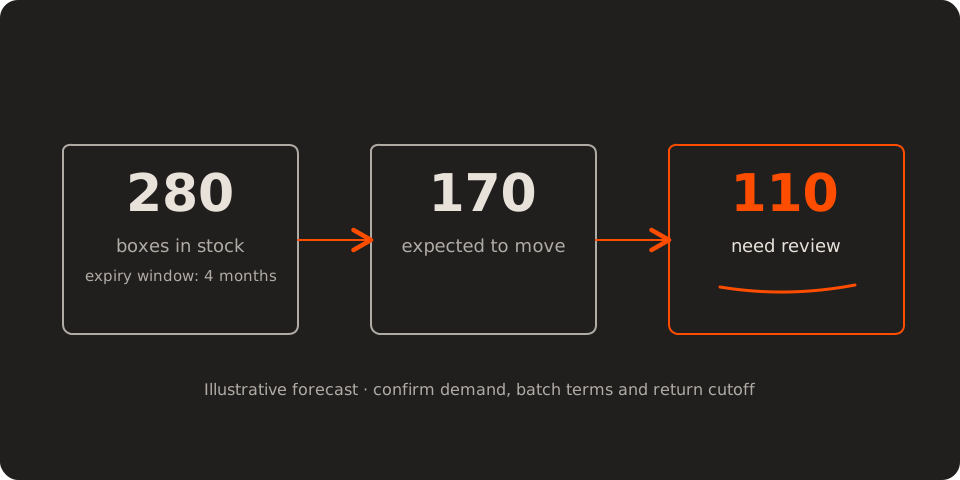
The figures are illustrative. Demand can change, and your team still needs to confirm batch eligibility, commercial terms, and local compliance requirements.
That gives your team time to review eligible returns or adjust purchasing before the available window closes. Compare the value flagged early with the value actually sold or credited. An alert identifies exposure; it does not prove that money has been recovered.
5. Give Salespeople the Right Collection Follow-Up
A dispatched order can create weeks of work after the sale. Accounts knows which invoice is due, the salesperson knows the relationship, and the retailer may have promised a payment on a call that nobody else heard.
Pharmacy billing and collection software can place the invoice, due date, payment history, promise date, and responsible person in one follow-up view. It can prepare reminders and escalate overdue items according to rules your agency chooses.
For example, a retailer promises to settle an invoice on Friday. Your salesperson sees the promise before the next visit, and accounts can record a received payment before another reminder goes out. A well-informed follow-up protects the relationship as well as the receivable.
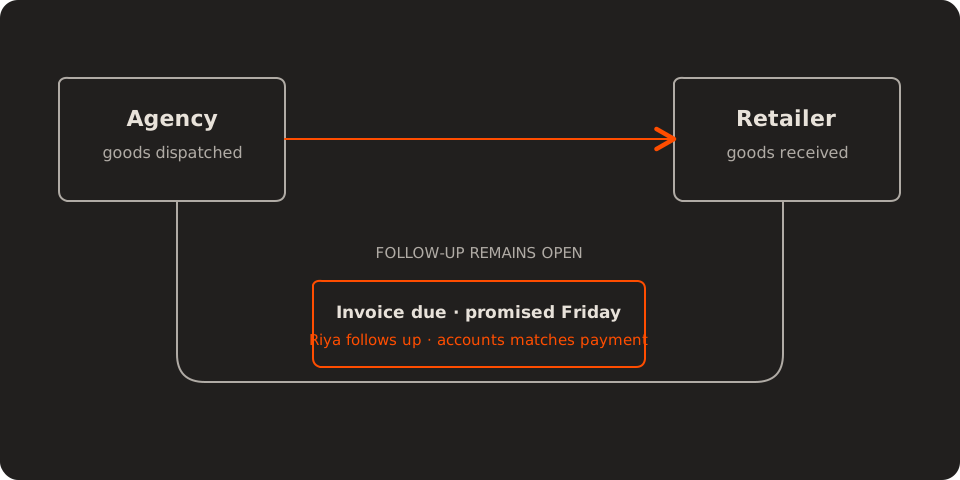
Follow-up becomes more consistent, and your team spends less time asking each other what was agreed. Review overdue invoice value and kept payment promises, with disputed balances visible separately. More reminders alone are not evidence of better collections.
6. Apply the Right Scheme While the Order Is Open
Company schemes, changed rates, quantity offers, and product messages often arrive separately from the retailer order. A useful offer may sit in a message while the billing operator works in another screen.
A scheme management workflow connects valid dates, eligible products, quantities, retailers, and commercial conditions to the order being prepared. When an order appears to qualify, the software can show the relevant scheme for a person to verify.
For example, a retailer orders an eligible quantity during an offer period. Billing sees the applicable terms before confirming the price. That can prevent a later disagreement about free units or a credit adjustment, while helping your salesperson explain the offer accurately.
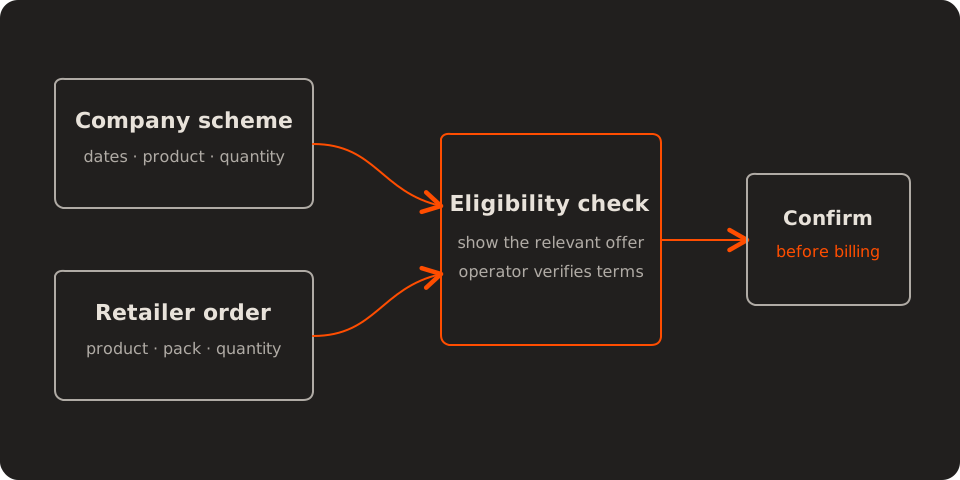
An offer becomes useful when your team can apply and explain it correctly. Review scheme-related corrections after billing, and confirm the effect on your margin before encouraging larger orders.
7. Keep Returns Open Until the Credit Is Settled
When a retailer sends medicine back, the physical box may reach your godown long before the financial process is complete. The batch and reason need checking, a supplier claim may need submission, approval can arrive later, and accounts still has to reconcile the credit note.
Returns management software can keep one case open across the godown, claims, company response, and accounts. Each handoff has an owner, a date, and supporting evidence, so the return remains visible until both stock and money are settled.
Suppose a retailer returns a damaged pack and the company asks for supporting photos. A named claims owner sees that request and its deadline. Accounts can distinguish a claim awaiting evidence from an approved credit still awaiting reconciliation.
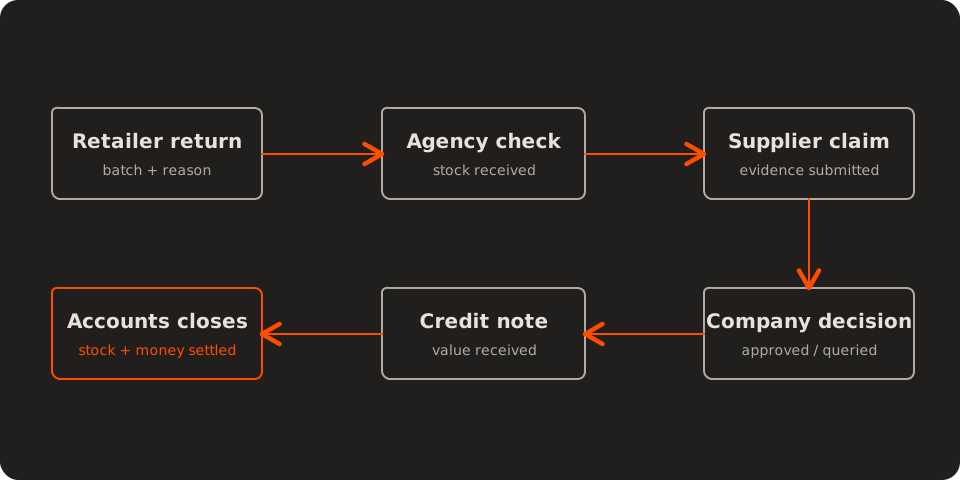
A returned box and a recovered balance are two different milestones. Keep retailer adjustments and supplier claims linked but separately recorded, because their amounts and timing may differ. Review the value and age of unresolved cases.
8. Show the Owner What Needs Attention Today
Orders may be in billing, payments with accounts, stock in inventory, returns in a register, and field updates with salespeople. A large dashboard can display all of that and still leave you wondering where to start.
The better output is a short exception list: orders waiting, payments overdue, stock running low, expiry risk, and returns still open. Each item should say what happened, who owns the next action, and when it is due.
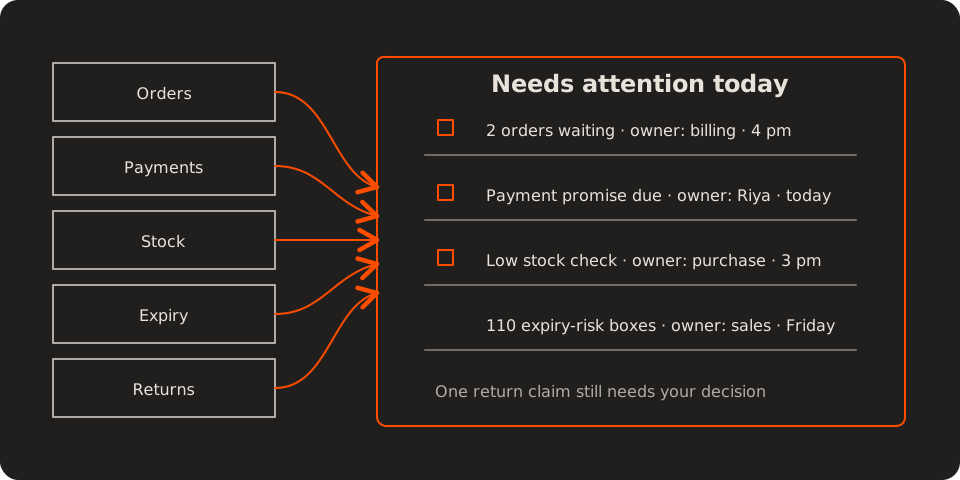
For example, billing owns two orders waiting for clarification, while a disputed return needs your decision. You can handle that decision without chasing every routine update. Review overdue priority tasks and how often routine work still needs your intervention.
Start With the Lifecycle That Repeats Every Day
You do not need to automate all eight areas at once. Start where repeated work is delaying sales, hiding risk, or pulling the same person into the same follow-up every day. Record a simple baseline, trial one workflow with the people who use it, and compare the result after the process has settled.
Start by checking whether your existing software already supports the workflow and whether your team can keep its records current. A configured feature or connection may be enough. A custom workflow becomes worth considering when a recurring gap remains and your existing tools can share the necessary data.
Before buying, ask for a demonstration using one of your typical orders and one awkward case: an unclear pack size, a partial payment, or a disputed return. Check who handles the exception and how it reaches closure. Compare the expected benefit with setup, integration, training, and ongoing support costs. Our guide to identifying software requirements can help you turn that recurring problem into a clear brief.
If you want help assessing the fit, send Melman Labs an outline of the workflow, the tools you use, and where your team repeats the same work. We can review the gap and scope a focused next step.
Come back to closing time. You should be able to open one view, see the few items that need your decision, and know who is handling the rest. That is the outcome to ask the software to demonstrate: “What needs my attention before we close?” answered without three phone calls.