An order arrives on WhatsApp while you are helping another customer. You reply, copy the details into a spreadsheet, and promise to confirm the delivery date. Later, a colleague checks whether the payment has arrived. By the afternoon, the customer is asking for an update, and you are scrolling through messages to remember what you agreed.
Nothing has broken. The order may still go out on time. Yet several people have spent part of their day keeping one ordinary request moving.
This is how a business software problem can go unnoticed. It feels like answering messages, checking details, and keeping everyone informed. Each task is small enough to accept. Together, they make work harder to manage.
Your business may need better software when repeated admin, scattered records, and constant status questions begin to delay the work customers are paying you to do. The right response could be a shared form, an existing application, or a connection between tools you already use.
Before choosing anything, it helps to understand where the effort is going.
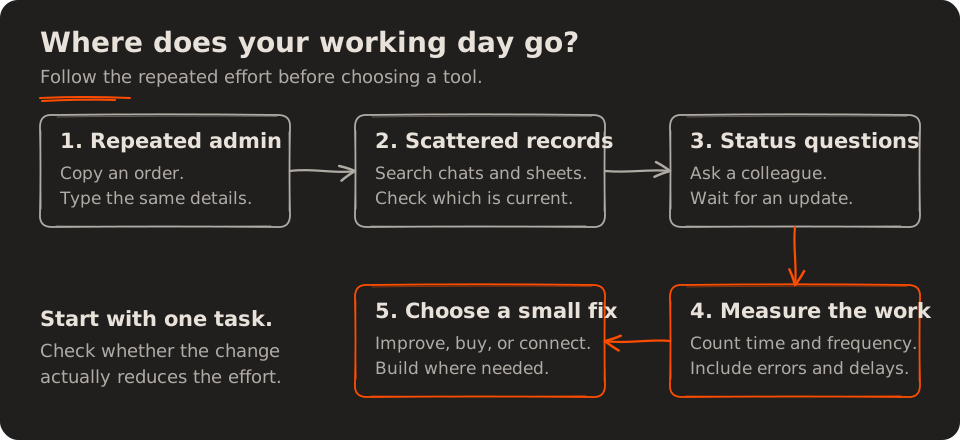
What does “needing software” actually mean?
You probably already use software every day. Your messages, spreadsheets, calendar, and accounting application all count. The question is whether those tools support the whole job.
For a small business, workflow automation means letting a system carry out a repeatable step when something happens. A booking might create a calendar entry. An approved quote might become an order. A confirmed dispatch might trigger a customer update.
The value comes from making information available where it is needed, with fewer manual steps between one person and the next.
There is broader evidence that this coordination takes time. Asana’s State of Work Innovation report, based on a survey of more than 13,000 knowledge workers across six countries, reports that 53% of their time goes to activities such as coordinating work, finding information, and checking progress. That is context from a vendor’s survey, not a measure of your business or a promise that all those hours can be removed.
Your own working week is a better place to start.
1. You enter the same information more than once
Think about what happens after you accept an order. You may type the customer’s name into a sheet, copy their address into a delivery message, and enter the amount again when preparing an invoice.
Each copy creates another place to keep up to date. If the customer changes the address, someone must remember every place the original appeared. A task that looked like simple data entry now includes checking and correcting records.
Repeated data entry is a useful signal because it is easy to observe and measure. Count how often it happens, time a few ordinary examples, and include the time spent fixing mistakes.
| Repeated task | Time per task | Times per day | Hours per month |
|---|---|---|---|
| Copy order details | 2 minutes | 15 | 11 |
| Send a routine update | 3 minutes | 10 | 11 |
| Find an old record | 5 minutes | 5 | 9.2 |
| Total | 31.2 |
Illustrative calculation using 22 working days. These are separate tasks; avoid counting the same minutes twice when measuring your own process.
Thirty-one hours is close to four eight-hour working days. That does not mean software will recover every minute. It does show why a two-minute task deserves attention when it happens throughout the day.
A sensible first change is capture once, reuse where needed. A form could collect the order details in a consistent format, and the resulting record could supply the packing list and invoice. Someone still checks unusual requests, but the ordinary information does not need to be typed repeatedly.
2. The full story is spread across chats, sheets, and inboxes
A spreadsheet can tell you that an order exists. A chat may contain the latest delivery address. An email may explain why the customer needs it a day early.
Individually, these records are useful. The difficulty appears when somebody needs the whole picture. They have to search several places, compare versions, and work out which update came last.
Consider a repair business. The technician needs the reported fault, the quote approval, the parts status, and the promised collection date. If each detail lives somewhere different, even a simple customer update becomes an investigation.
What helps here is a shared, reliable record. Each job needs an identifier, a current status, an owner, and links or notes for the details that matter. The team also needs an agreement about where updates belong.
That record could begin as a well-managed spreadsheet. More specialised software becomes useful when permissions, linked records, reminders, or several people editing at once become difficult to handle.
The practical test is simple: can someone open a job and understand what needs to happen next without asking you to reconstruct its history?
3. People keep asking for updates that already exist
“Has the quote been approved?” “Is the order ready?” “Did the customer pay?”
These are reasonable questions. They become expensive when answering each one means interrupting a colleague or searching through several tools.
Imagine receiving 20 status questions a day. At three minutes to check and answer each one, that is an hour a day, or 22 hours over a 22-day month. This is another illustrative example; it may overlap with the update and search time in the earlier table.
The underlying issue is status visibility. People cannot easily see what has happened, so they ask someone who might know.
A shared view can help the team see which jobs are waiting for approval, ready to start, or complete. A customer notification can explain that an order has been dispatched and what happens next. Both depend on the status being accurate and someone being responsible for updating it.
Choose a few clear stages that reflect the real work. “In progress” is less useful if it could mean anything from “we have received your request” to “your order is packed and waiting for collection”.
Useful updates explain where the work stands, what happens next, and whether anyone needs to act.
4. Taking a day off means staying available
Suppose you are away tomorrow. Can someone else see which orders need attention, which customers are waiting, and which promises have already been made?
If the team needs to call you for routine details, important parts of the process live in your memory.
This often happens for understandable reasons. The owner handled the first customers, learned the exceptions, and became the person everyone asks. As the business grows, that helpful habit becomes a limit on what others can do.
Start by writing down the information another person needs to continue a job: its owner, current stage, next action, due date, and any relevant exception. A shared record makes that information available during a handover.
Human judgement still matters. A refund may need approval. A delivery change may need a conversation. Software can bring the request and its history together, record the decision, and remind the next person to act.
The aim is for your colleagues to handle routine work confidently and bring you the decisions that need your attention.
5. More orders bring the same increase in admin
More customers naturally create more work. A bakery must prepare more food, and a repair shop must complete more repairs.
But some supporting tasks can grow unnecessarily. If doubling your orders means doubling the time spent copying details, checking payment records, and sending standard messages, your administrative process deserves a closer look.
Measure admin time per order, not only total hours. Total admin may rise as the business grows even when the process improves. Time per order helps you see whether each job requires less handling.
Other useful measures include how often a record needs correction, how long a job waits between stages, and how many customer enquiries are requests for status. Choose one or two that match the problem you actually have.
If you have recognised a specific bottleneck, our guide to business process automation for operations teams explains how to turn it into a focused first project.
Should you improve a spreadsheet, buy software, or build it?
Recognising these signs gives you a problem to solve. The next decision is how much change that problem needs.
A small, stable process may work well with clearer responsibilities and a better spreadsheet. A common business function may fit an existing product. A distinctive process may need an integration or a custom application.
| Approach | When it may fit | What to check |
|---|---|---|
| Improve the process | Ownership or approval rules are unclear | Can clearer responsibilities remove the delay? |
| Use a form or spreadsheet | A small team handles a simple workflow | Can everyone find and update the correct record? |
| Buy existing software | You need scheduling, invoicing, or another common function | Does it handle your everyday work and exceptions? |
| Connect existing tools | People copy data between otherwise useful tools | What happens when a transfer fails? |
| Build custom software | Important requirements exceed what existing tools support | Who will maintain it and support users? |
Walk through a real job before making the choice. Include an ordinary order, a changed address, a cancellation, and a missing payment. A system that looks simple in a demonstration may require extra work when something goes off plan.
Also ask how you will export your records and who can access them. These details matter when changing systems or handing work to another team member.
What a simpler order process could look like
Return to the order that arrived on WhatsApp. The conversation can still happen there. The improvement is that, once the order is agreed, its essential details enter a shared record.
That record shows the customer, items, delivery details, payment status, and person responsible. The team updates it as the job moves forward. Where the tools support it, a confirmed change can trigger the next task or customer notification.
The customer has a clearer expectation. A colleague can check progress. You have fewer details to carry in your head.
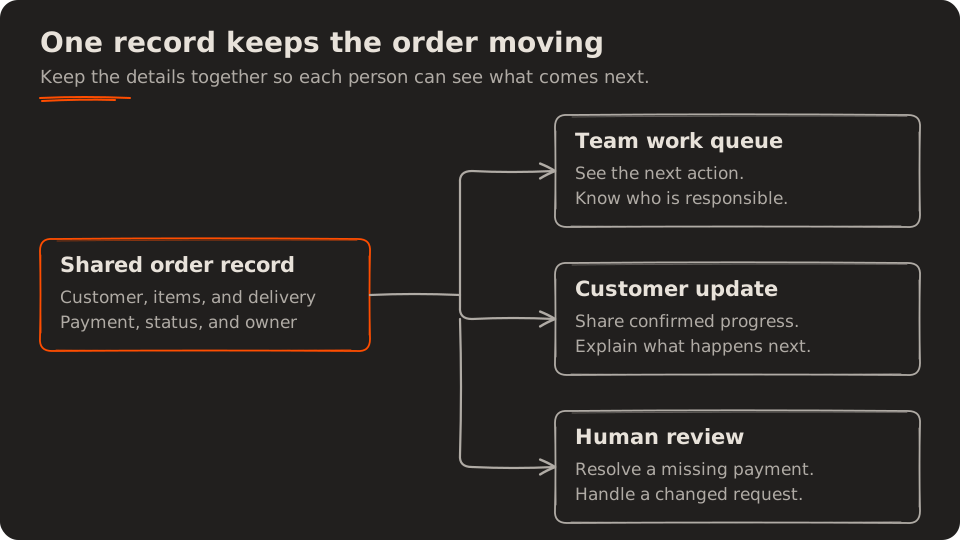
An example of information flowing from one record. Automatic updates require connected tools and reliable status changes.
The less common cases need a clear path too. A payment that cannot be matched should appear for review. A failed notification should be visible to the team. A customer should still be able to reach a person when the standard process does not answer their question.
Useful automation makes exceptions easier to notice as well as making routine steps easier to complete.
How to estimate whether the change is worth it
Start with time rather than a vague expectation that software will “pay for itself”. Use observations from your own work:
Monthly hours recovered = minutes saved per task × tasks per day × working days ÷ 60
If a change saves four minutes on a task performed 30 times a day, over 22 working days, the estimate is 44 hours per month.
Treat that as a starting estimate. Subtract any new time needed to review exceptions, maintain records, or correct failed automation. Compare the result with the full cost of the change: setup, subscriptions, training, maintenance, and support.
Recovered hours are available capacity, not automatically cash savings. They may let your team respond sooner, handle more orders, or finish work without staying late. A cash saving depends on whether spending actually falls.
For a first pilot, measure the same task before and after the change under comparable conditions. Keep track of errors as well as speed. Faster processing has limited value if the team must spend the afternoon correcting it.
When more software will not help
Sometimes the delay comes from a rule nobody has agreed on. Perhaps every quote waits because it is unclear who can approve a discount. Putting those quotes in a new application will still leave them waiting.
Agree on the responsibility first. Then decide whether software can support it.
Be equally cautious when a proposed tool adds another place to enter information, or when a rare task would take more effort to automate than to complete. Frequency matters, but so does consequence: an occasional task can still deserve attention if missing it has a serious impact.
Our article on when software creates more work than it removes looks more closely at this problem.
Common questions about software for a small business
How do I know if my business needs software?
Look for repeated data entry, hard-to-find records, routine status questions, and work that depends on one person’s memory. Measure the most disruptive example. The case for a change is stronger when the same problem repeatedly causes delays, mistakes, or avoidable effort.
Can a spreadsheet be enough?
Yes. A spreadsheet can support a simple process when people agree on the structure, ownership, and update rules. Consider another approach when keeping records consistent, controlling access, or coordinating related work takes too much manual effort.
Do I need custom software to automate tasks?
Many tasks can be handled through an existing application’s features, a form, or a connection between tools. Custom software becomes worth considering when important requirements remain unmet and the expected benefit supports the cost of building and maintaining it.
Does workflow automation require AI?
Many routine workflows use straightforward rules: when a booking is confirmed, create a task; when an order is dispatched, send an update. AI may help with less structured material, but it introduces questions about accuracy and review. Start with the behaviour you need and choose the technology around it.
Start with one part of your working week
For a week, note the tasks that make you stop and copy, search, check, or remind. Record how often each happens, roughly how long it takes, and what goes wrong when it is delayed.
Choose one recurring problem. Describe the improvement in everyday language: “Anyone handling an order should be able to see its payment status without asking the owner.” That is specific enough to compare possible solutions.
You might discover that a shared form is enough. You might need to connect two tools. You might have a good reason to commission a small application.
Choose the smallest change that removes a measured problem. The result should be visible in an ordinary working day: fewer repeated steps, clearer records, and more time for the work your customers came to you for.