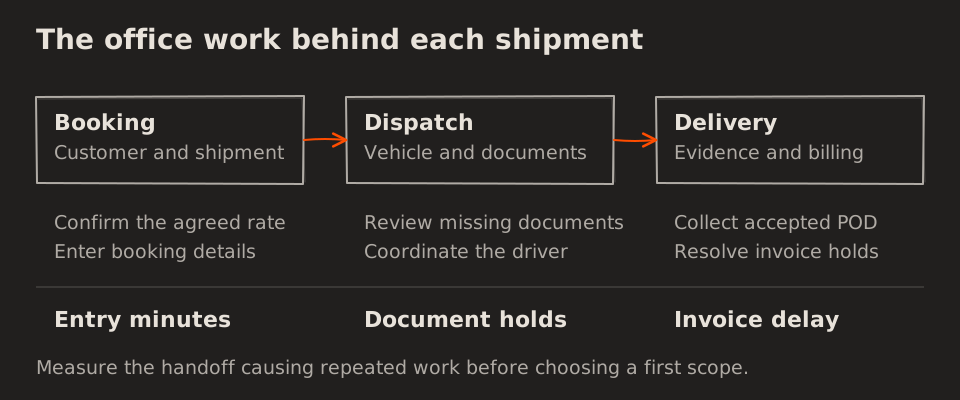
If you run an industrial courier company, a moving truck tells you only part of the story. Your office may still be confirming the rate, finding shipment documents, calling the driver and collecting the proof needed to raise an invoice. The goods move forward while the paperwork falls behind.
At Melman Labs, we approach industrial courier software by examining those handoffs with you. Which details does your team enter more than once? What holds up dispatch? What keeps a delivered shipment from becoming billable? The answers help define a useful first version of your system.
This guide explains ten workflows you can connect, how we would scope an initial implementation, and the measures that tell you whether it helps.
What should industrial courier software do?
Industrial courier software connects booking, rates, vehicle assignment, documents, driver updates, proof of delivery, expenses and billing. Each team works from linked records, so information follows the job from enquiry to financial review.
A shipment is a customer’s consignment. A trip is a vehicle movement that may carry several shipments. Keeping these distinct lets you track what each customer owes and what the vehicle movement costs.
Vehicle tracking can support that process. Its priority depends on your business: if location visibility is adequate but invoices wait for paperwork, we would investigate the billing handoff first.
Ten courier workflows you can improve
This is a shortlist for discussion, not a universal implementation order.
| Workflow | Practical software change | Measure to watch |
|---|---|---|
| Booking | Reuse one shipment record | Entry minutes per booking |
| Dispatch | Share vehicle and shipment status | Ready-to-assigned time |
| Quotations | Apply agreed customer rate cards | Quote turnaround |
| Load planning | Check capacity and compatibility | Weight and volume utilisation |
| Documents | Review readiness before dispatch | Document-related holds |
| Factory visits | Capture arrival and service times | Waiting hours per visit |
| Driver updates | Record statuses and exceptions | Follow-up calls per trip |
| Proof of delivery | Link accepted evidence to shipments | Delivery-to-invoice time |
| Expenses | Reconcile advances and receipts | Unsettled trips |
| Financial review | Match revenue to direct costs | Contribution per trip |
1. Enter shipment details once
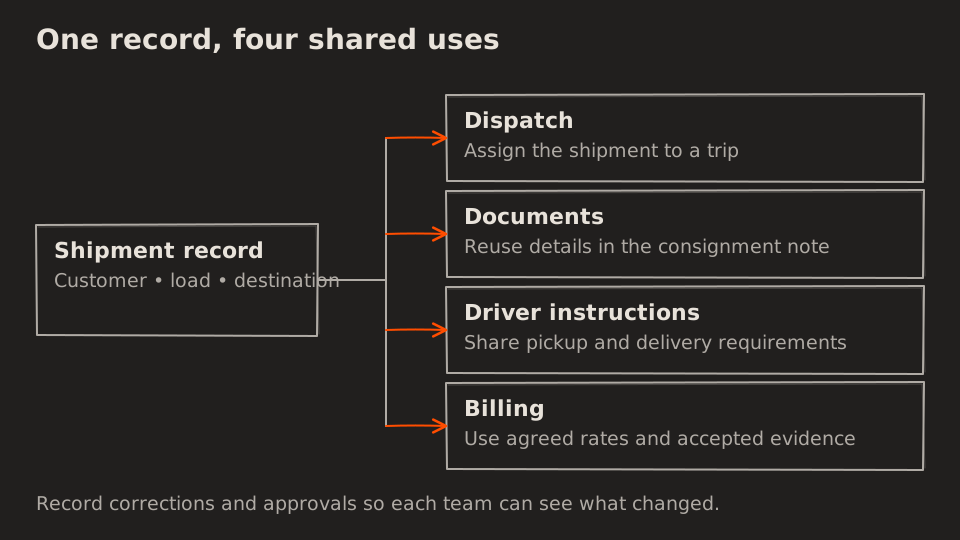
If your team copies a booking from WhatsApp into a register, a consignment note and a billing sheet, each copy adds work and a chance for a mismatch.
We would start with a shared record containing the customer, consignee (the receiver), material, weight, destination and document references. Dispatch, the lorry receipt (LR), driver instructions and billing can reuse those details.
Changes still need ownership. A corrected destination should reach dispatch; a rate change after approval should record who changed it and why.
2. Give dispatch a shared view of the day
Your dispatcher needs unassigned shipments, available vehicles, drivers, pickup windows and exceptions in one place. A shared board lets colleagues check that information without another call.
We would define statuses with your team before adding assignment suggestions. “Available” must account for driver readiness and vehicle restrictions. The dispatcher should approve or change suggested assignments.
3. Make customer rates easier to apply
Customers may have different route rates, weight slabs, minimum charges and waiting-time agreements. A rate card can propose a quotation from agreed rules and send exceptions for approval.
We would include effective dates so a new agreement does not silently change an older booking. Measure quotation speed alongside corrections after approval: a faster incorrect quote creates more work later.
4. Check usable capacity before departure
Two shipments going in the same direction may still need different delivery windows, handling arrangements or vehicle types.
For example, a vehicle with 10 tonnes of usable payload carrying 6.5 tonnes has 65% weight utilisation and 3.5 tonnes of remaining payload. That does not establish how much floor space is available. Volume and loading constraints need separate checks.
We would show compatible bookings and capacity together, leaving the final choice with dispatch. Empty return distance should also appear in route reviews.
5. Review documents before the dispatch stage
A checklist can surface missing information before the vehicle is ready to leave. We would configure it around requirements your business has confirmed, including customer paperwork and relevant transport references.
Uploading a file does not establish that its contents are correct. Assign someone to review exceptions and record authorised overrides so responsibility is visible alongside document status.
6. Separate waiting time from loading time
A truck arriving at 11:00 and leaving at 16:00 has five hours of site dwell time. That may include queuing, loading and exit processing. Calling all five hours “waiting” hides where the delay occurred.
Capture arrival, loading start, loading end and departure separately. Where detention charges apply, use the customer’s agreed allowance, chargeable events and approved timestamps. Site dwell is not automatically billable detention.
7. Make driver updates practical
A driver workflow can focus on arrived, loading complete, departed, delivered, add expense and report a problem. Updates should be practical to enter while safely parked.
We would check devices, language needs and connectivity with your team. If offline capture is needed, the office should see whether an update has synced and when the event happened. Missing updates need follow-up rather than an assumed status.
8. Connect proof of delivery to invoice readiness
Proof of delivery (POD) is the evidence your customer accepts for a completed delivery. One customer may accept a photograph; another may require a signed original or additional references.
Attach evidence to the correct shipment and show whether accounts has accepted it. Delivery alone should not mark a shipment billable when other requirements remain outstanding.
Track why jobs remain unbilled: missing POD, a rate dispute and an internal billing backlog need different remedies. Earlier invoicing does not guarantee earlier payment.
9. Reconcile advances and expenses per trip
A driver advance is money issued, not an additional expense on top of the purchases it pays for. Keeping them separate prevents double counting.
For example, a ₹10,000 advance with ₹8,700 of approved expenses leaves ₹1,300 to return or carry forward under your settlement process. Receipts, disputed amounts and missing costs should remain visible until settlement is complete.
10. Review contribution with clear cost definitions
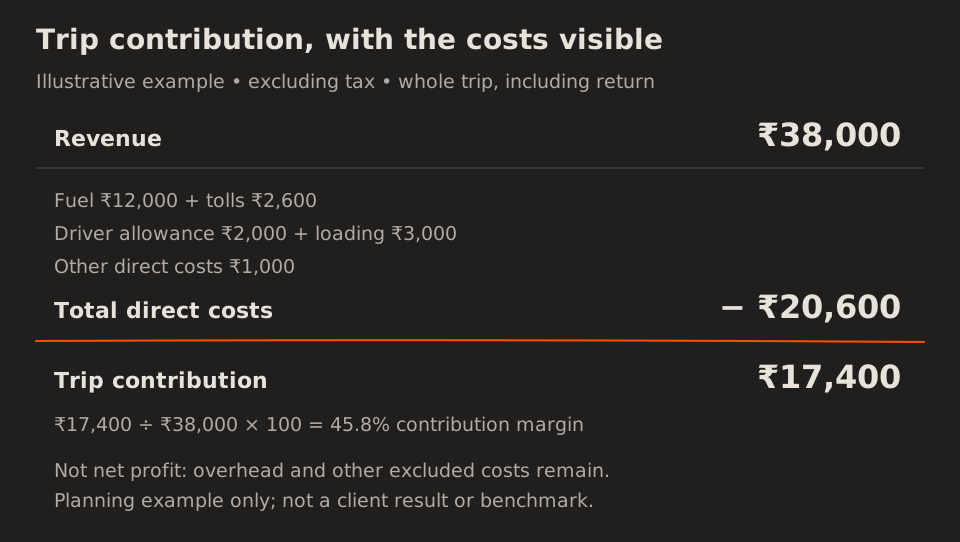
Revenue alone cannot tell you whether a trip supports the business. The example below is illustrative, not a client result or industry benchmark. It assumes a consistent basis excluding tax and direct costs covering the whole trip, including the return leg.
| Example trip | Amount |
|---|---|
| Revenue | ₹38,000 |
| Fuel | ₹12,000 |
| Tolls | ₹2,600 |
| Driver trip allowance | ₹2,000 |
| Loading and unloading | ₹3,000 |
| Other direct costs | ₹1,000 |
| Total direct costs | ₹20,600 |
| Trip contribution | ₹17,400 |
Contribution = revenue − direct costs: ₹38,000 − ₹20,600 = ₹17,400. The contribution margin is 45.8%, rounded to one decimal.
This is not net profit. Office overhead, fixed salaries, vehicle ownership costs and other excluded expenses still need to be accounted for. We would agree the definitions with your accounts team before using a dashboard for pricing decisions. Avoid counting fuel twice when a hired vehicle charge already includes it.
How we would scope your first version
We would follow one real booking with your operations and accounts teams: how it is quoted, assigned, dispatched, delivered and invoiced. Redacted booking sheets, rate cards and invoices make that discussion concrete.
The first scope should connect one complete workflow. If POD collection is the bottleneck, that might mean shipment records, evidence review and an invoice-ready queue. If dispatch is the issue, booking, vehicle availability and assignment may come first.
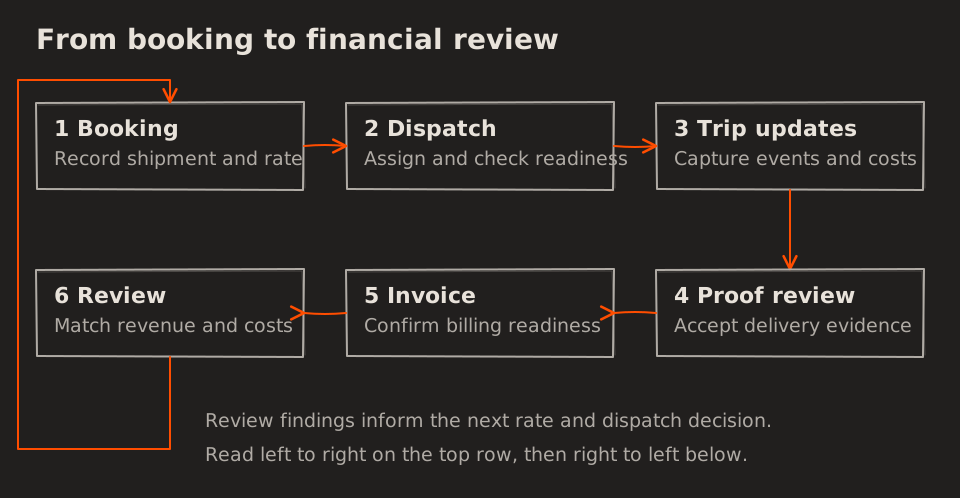
Before rollout, we would agree who owns each status, who can correct records and what happens when information is missing. A pilot with a defined team or route makes it easier to check the process before extending it.
Your accounting or fleet software may remain part of the solution. Integration scope depends on supported access and data quality. Our guide to identifying software requirements can help you prepare the initial discussion.
How to measure whether automation helps
Capture a baseline, then compare equivalent work: similar routes, shipment types, volumes and staffing. Record the period and sample size so a quieter week does not look like a software improvement.
| Metric | How to calculate it |
|---|---|
| Booking effort | Active entry minutes ÷ completed bookings |
| POD acceptance delay | Time from delivery to accepted evidence |
| Invoice delay | Time from delivery to invoice issuance |
| Site waiting | Time from arrival to loading start |
| Weight utilisation | Loaded weight ÷ usable payload × 100 |
| Empty-distance share | Empty kilometres ÷ total kilometres × 100 |
| Contribution margin | (Revenue − direct costs) ÷ revenue × 100 |
Use positive denominators; flag missing data instead of treating it as zero. For delays, review the median and the slowest cases so a typical improvement does not hide shipments still waiting for weeks.
Here is a hypothetical planning example. Forty daily bookings at six minutes of active entry take 240 minutes. If a pilot reduces that to three minutes per booking, the difference is 120 minutes: two staff-hours a day, or 52 staff-hours across 26 working days.
These are example inputs, not a forecast. Time released may support more bookings or less overtime; it does not automatically reduce payroll. Compare observed benefits with implementation, support and training costs.
Common questions about courier automation
Do you need custom courier software?
Not necessarily. An existing product may cover your workflow well. Custom software is worth evaluating when specific rate rules, approvals, documents or connections between systems create recurring work that your current tools cannot handle. We would compare that fit before defining a build.
Do you need GPS in the first version?
It depends on your requirements. Driver event updates can support dispatch and billing, but they do not provide continuous location. If live location is a customer requirement, include it in the initial scope.
Can it connect to your accounting system?
That depends on supported integrations and your access. A reviewed export may be a workable first step. Automated synchronisation needs clear ownership, duplicate prevention and a way to handle rejected records.
What should you prepare for a discussion with Melman Labs?
Bring a typical booking-to-invoice example, the exceptions your team handles and any baseline measures you already collect. Remove customer-sensitive information from materials shared for an initial review.
Use these to outline your requirements. Start with the handoff creating the most repeated work, connect the records around it, and measure the result before expanding.